

To improve page speed on a contractor website, compress job photos, remove unused scripts, reduce render-blocking code, improve server response and test the pages where customers request service. In 2026, aim for a Largest Contentful Paint (LCP) of 2.5 seconds or less and an Interaction to Next Paint (INP) of 200 milliseconds or less, the thresholds Google classifies as good. A fast homepage does not fix a slow quote page.
- Page speed contractor website checklist: test the quote page on mobile before changing the homepage.
- Google PageSpeed Insights is the first check; use Search Console to track Core Web Vitals across pages.
- In 2026, Google's good thresholds are 2.5 seconds for LCP, 200 milliseconds for INP and 0.1 for CLS.
- Fix oversized photos, unused scripts and slow server responses before adding more tools to a landing page.
How to improve page speed for contractor websites
Start with the page that handles calls and quote requests, not the homepage by default. Its speed matters alongside the conversion rate on a contractor website: if visitors cannot use the form or phone link promptly, faster traffic acquisition will not solve the problem.
Google's Core Web Vitals guidance sets these thresholds for a good experience. The metrics describe different problems, so one passing score cannot stand in for the others.
| Metric | Good threshold | What to inspect on a contractor page |
|---|---|---|
| Largest Contentful Paint (LCP) | 2.5 seconds or less | The main image, heading or other largest visible element |
| Interaction to Next Paint (INP) | 200 milliseconds or less | Response when a visitor taps the menu, phone link or form controls |
| Cumulative Layout Shift (CLS) | 0.1 or less | Buttons or fields moving as images, fonts and widgets load |
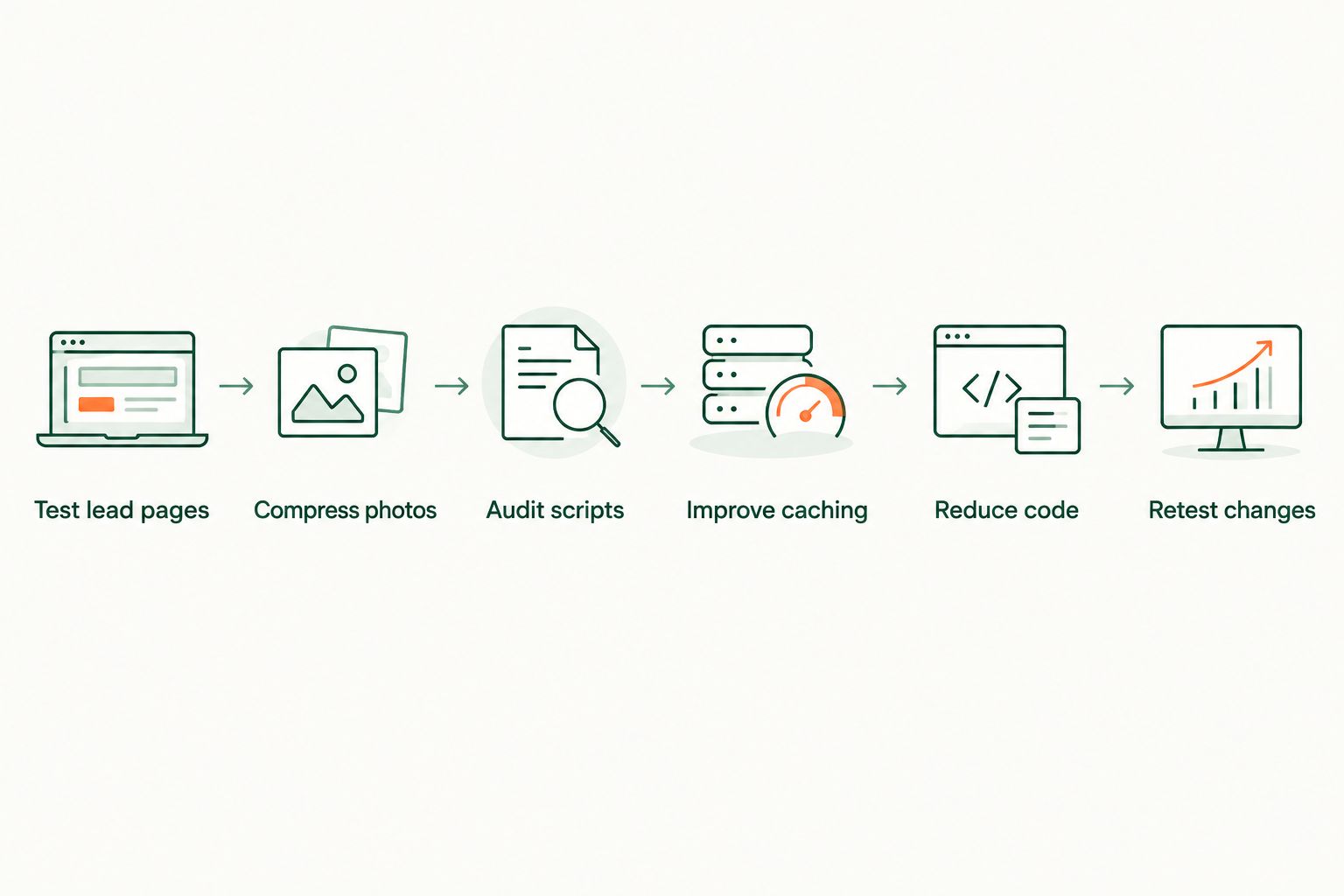
Use these steps in order as a diagnostic sequence, not a promise that every site has the same bottleneck.
- Test the pages that receive leads. Run the mobile version of your quote page, core service pages and paid-ad landing pages through Google PageSpeed Insights. Record LCP, INP and CLS separately. Then open the same pages on a phone and try the call link and form; a performance score does not tell you whether the route to booking works.
- Right-size and compress job photos. Check the hero image first, then before-and-after galleries. Serve an image sized for its displayed area, use an appropriate modern format such as WebP or AVIF, and defer images below the initial viewport. Do not lazy-load the main image if doing so delays LCP.
- Audit third-party scripts. List what your chat widget, review embed, analytics tags, advertising pixels and scheduling tools load. Keep the tools that support an active purpose; remove abandoned tags. Test after each change so you do not accidentally break call tracking or form submissions.
- Address server response and caching. Check whether the server responds slowly before the browser starts loading the page. Review hosting, caching and delivery of static files with your developer or hosting provider. A content delivery network can help serve static assets, but it will not repair a slow application response by itself.
- Reduce render-blocking code. Identify CSS and JavaScript that delay the first visible content. Defer nonessential scripts and remove unused code where the site setup allows it. Test menus, forms and tracking afterward; removing code without checking those functions trades one lead problem for another.
- Retest after publishing changes. Compare the same URL, device setting and metrics before and after each fix. Keep the results with the page changes so the next plugin, widget or campaign launch does not erase the gain unnoticed.
A fast loading animation is not the goal. The homeowner needs to see the service, tap the phone number and use the quote form without waiting for the rest of the marketing stack.
Why this matters for booked jobs
A contractor pays to bring a visitor to a page through ads or works to earn that visit through local search. If the page delays the phone link, shifts a form button or takes too long to display the service, the visitor has a harder path to contacting the business. That is why page speed belongs in the same review as calls, form submissions and booked jobs.
Roxfire is best for South Florida home service businesses that need Google Ads and local SEO tied to lead generation; speed fixes still require diagnosing the actual page. An agency campaign cannot make a slow form usable through targeting alone. Check the landing page before increasing spend on traffic to it.
Speed also affects what you can learn from a campaign. If one landing page loads slowly and another does not, their lead results do not isolate the effect of the ad copy or offer. Fix the page experience first, then compare campaign performance without that avoidable difference.
What to measure before changing the site
PageSpeed Insights presents both available real-user data and a controlled Lighthouse test. Read the source of each number. A Lighthouse run diagnoses the page under simulated conditions; it is not a record of every visitor's experience. Field data, when available, shows how real Chrome users experienced a page over a rolling 28-day period.
Search Console's Core Web Vitals report groups URLs by mobile and desktop experience. Use it to spot a broader issue, then inspect individual URLs in PageSpeed Insights. A passing homepage does not establish that a roofing service page or an ad landing page passes. In 2026, keep a short list of the pages that actually receive leads and check each one.
For each priority URL, write down:
- Where the visitor came from. Identify whether the URL is used for organic search, Google Ads or another campaign.
- What the visitor needs to do. Note the phone link, quote form or booking action the page presents.
- Which metric fails. LCP points you toward visible loading, INP toward interaction delays, and CLS toward elements moving unexpectedly.
- What the diagnostic identifies. Record the specific image, request or code task before asking a developer to change it.
- Whether the action still works afterward. Submit a test form and check the phone link and tracking after the fix.
A performance score alone cannot tell you whether the form reaches the right inbox or whether a call becomes a booked job. Pair the technical check with the lead path, especially when reviewing landing page design for home service PPC campaigns.
Why contractor website speed varies
The same speed advice does not produce the same result on every page. These factors determine where to look first:
- Image size. A gallery with photos uploaded at their original dimensions can require more data than the displayed page needs. Resize for the layout rather than assuming the browser will make the download smaller.
- Image placement. A below-the-fold photo can load later; the main visible image usually needs priority. Applying the same loading rule to both can make LCP worse.
- Embedded tools. Chat, reviews, maps and booking tools can introduce their own requests and code. Judge each embed by whether visitors need it on that page.
- Theme and page-builder code. A page can load styling and scripts for features it never displays. Removing unused code requires testing so the working features stay intact.
- Server response. Image compression cannot correct a delay that happens before the server sends the page. Separate server problems from browser-loading problems in the diagnostic.
- Device and connection. A desktop check does not replace a mobile check. Review both, then give priority to the experience your lead pages present on a phone.
For a page with a large before-and-after gallery, start with images. For a lean page with multiple embeds, start with scripts. The right first fix is the one tied to the failing metric on the URL that produces leads.
Does page speed affect contractor SEO?
Yes. Google uses Core Web Vitals in its ranking systems, but good scores do not replace relevant service information or a page that answers the searcher's question. In 2026, treat speed as part of a usable local-search page, not as a shortcut to rankings.
Check the mobile service page that targets the query, rather than relying on a homepage result. A fast page that does not describe the service and area clearly still fails to answer what the homeowner searched for.
Can a faster page improve Google Ads results?
A faster page addresses one part of landing page experience in Google Ads; it does not guarantee more leads or a lower cost per lead. Google also evaluates factors such as relevance and usefulness. Measure whether people can reach the call or form action, then review the campaign's qualified leads and booked jobs.
If ads send visitors to a page with a delayed hero image or unresponsive form, fix that page before interpreting weak lead results as a targeting problem. In 2026, a speed check should be part of the review when a campaign changes landing pages.
Should you redesign a slow contractor website?
No, not on speed evidence alone. First identify whether the delay comes from images, scripts, hosting or code. A redesign that keeps the same oversized media and embeds can keep the same loading problems. Redesign when the page structure or lead path needs to change; use a targeted speed fix when the existing page works but loads poorly.
FAQ
How do I check page speed on a contractor website?
Run the specific lead page through Google PageSpeed Insights on mobile, then check Search Console for Core Web Vitals trends across URLs. Test the call link and quote form yourself as well.
What is a good LCP for a contractor website in 2026?
A good Largest Contentful Paint is 2.5 seconds or less under Google's Core Web Vitals thresholds. Check the page that receives leads, not only the homepage.
What is a good INP score for a contractor website?
A good Interaction to Next Paint is 200 milliseconds or less under Google's Core Web Vitals thresholds. INP reflects how promptly the page responds to interactions such as tapping controls.
Can oversized job photos slow a roofing or HVAC website?
Yes. Images downloaded at a larger size than the page displays add unnecessary data. Resize and compress them, but do not delay loading the main visible image.
Will a CDN fix a slow contractor website?
A CDN can improve delivery of static files, but it will not fix every cause of a slow page. Check server response, images and scripts before choosing the remedy.
Does a fast homepage mean my ad landing page is fast?
No. Test the exact URL used in the ad. Its images, embeds and form can differ from the homepage.
Should I remove chat and review widgets to speed up my site?
Remove unused widgets and test the impact of the ones you keep. Verify that lead capture, call tracking and forms still work after any script change.
One last thing
Before commissioning a rebuild, inspect the page your customer sees immediately after tapping an ad. In 2026, the practical speed question is not whether the homepage looks quick on an office computer. It is whether the service page loads, stays stable and lets a homeowner contact you on a phone. Fix that URL, retest its lead path, then move to the next priority page.